Search This Blog

Showing posts with label SQL Server. Show all posts

Friday, December 26, 2014

Sql Server - Function to Generate Date Range with differences like day,month,year


Sql Server - Function to Generate Date Range with differences like day,month,year
CREATE FUNCTION [dbo].[DateRange]
(
      @Increment              CHAR(1),
      @StartDate              DATETIME,
      @EndDate                DATETIME,
      @Custom      INT 
)
RETURNS
@SelectedRange    TABLE
(IndividualDate DATETIME)
AS
BEGIN
      ;WITH cteRange (DateRange) AS (
            SELECT @StartDate
            UNION ALL
            SELECT
                  CASE
                        WHEN @Increment = 'd' THEN DATEADD(dd, 1, DateRange)
                        WHEN @Increment = 'w' THEN DATEADD(ww, 1, DateRange)
                        WHEN @Increment = 'm' THEN DATEADD(mm, 1, DateRange)
                        WHEN @Increment = 'y' THEN DATEADD(yy, 1, DateRange)
                        WHEN @Increment = 'c' THEN DATEADD(DAY, @Custom, DateRange)
                  END
            FROM cteRange
            WHERE DateRange <=
                  CASE
                        WHEN @Increment = 'd' THEN DATEADD(dd, -1, @EndDate)
                        WHEN @Increment = 'w' THEN DATEADD(ww, -1, @EndDate)
                        WHEN @Increment = 'm' THEN DATEADD(mm, -1, @EndDate)
                        WHEN @Increment = 'y' THEN DATEADD(yy, -1, @EndDate)
                        WHEN @Increment = 'c' THEN DATEADD(DAY, -@Custom, @EndDate)
                  END)

      INSERT INTO @SelectedRange (IndividualDate)
      SELECT DateRange
      FROM cteRange
      OPTION (MAXRECURSION 3660);
      RETURN
END

Sql Server - Delete ALL Stored Procedure in Database


Sql Server - Delete ALL Stored Procedure in Database
//=================================================== GET ALL Stored PROCEDURE List
 
SELECT 'DROP PROCEDURE ' + p.NAME
FROM sys.procedures p

//=================================================== DELETE ALL stored PROCEDURE

DECLARE @procName VARCHAR(500)
DECLARE cur cursor
 
FOR SELECT [name] FROM sys.objects WHERE TYPE = 'p'
OPEN cur
fetch NEXT FROM cur INTO @procName
while @@fetch_status = 0
BEGIN
    EXEC('drop procedure ' + @procName)
    fetch NEXT FROM cur INTO @procName
END
close cur
deallocate cur

//====================================================
 

Wednesday, July 16, 2014

SQL Server– Concatenate Rows using FOR XML PATH()

SQL Server– Concatenate Rows using FOR XML PATH()

This is probably one of the most frequently asked question – How to concatenate rows? And, the answer is to use XML PATH.

For example, if you have the following data:

USE AdventureWorks2008R2

SELECT      CAT.Name AS [Category],

            SUB.Name AS [Sub Category]

FROM        Production.ProductCategory CAT

INNER JOIN  Production.ProductSubcategory SUB

            ON CAT.ProductCategoryID = SUB.ProductCategoryID


=====================================================================

 photo image_thumb30_zps55b27f3b.png
The desired output here is to concatenate the subcategories in a single row as:

We can achieve this by using FOR XML PATH(), the above query needs to be modified to concatenate the rows:

=============================================================================


 photo image_thumb31_zpsa80f40d6.png


USE AdventureWorks2008R2

SELECT      CAT.Name AS [Category],

            STUFF((    SELECT ',' + SUB.Name AS [text()]

                        – Add a comma (,) before each value

                        FROM Production.ProductSubcategory SUB

                        WHERE

                        SUB.ProductCategoryID = CAT.ProductCategoryID

                        FOR XML PATH('') – Select it as XML

                        ), 1, 1, '' )

                        – This is done to remove the first character (,)

                        – from the result

            AS [Sub Categories]

FROM  Production.ProductCategory CAT


Executing this query will generate the required concatenated values as depicted in above screen shot.

Sunday, July 6, 2014

SQL Server : Execute Dynamic Query with out parameter : specify output parameters in sp_executesql stored procedure

The sp_executesql system stored procedure is used to execute a T-SQL statement which can be reused multiple times, or to execute a dynamically built T-SQL statement. It takes parameters as inputs in order to process the T-SQL statements or batches. It also allows output parameters to be specified so that any output generated from the T-SQL statements can be stored .

Two scenarios in which the output parameters will be useful with sp_executesql are:
  • If sp_executesql generates output that will be useful, storing this output to an output parameter allows the calling batch to use the parameter for later queries.
  • If sp_executesql is executing a stored procedure that is defined using output parameters, the output parameters for sp_executesql can be used to hold the outputs generated from the stored procedure.

The following two examples demonstrate the use of output parameters with sp_executesql.

Example 1

DECLARE @SQLString NVARCHAR(500)
DECLARE @ParmDefinition NVARCHAR(500)
DECLARE @IntVariable INT
DECLARE @Lastlname varchar(30)
SET @SQLString = N'SELECT @LastlnameOUT = max(lname)
                   FROM pubs.dbo.employee WHERE job_lvl = @level'
SET @ParmDefinition = N'@level tinyint,
                        @LastlnameOUT varchar(30) OUTPUT'
SET @IntVariable = 35
EXECUTE sp_executesql
@SQLString,
@ParmDefinition,
@level = @IntVariable,
@LastlnameOUT=@Lastlname OUTPUT
SELECT @Lastlname
    
Example 2
CREATE PROCEDURE Myproc
    @parm varchar(10),
    @parm1OUT varchar(30) OUTPUT,
    @parm2OUT varchar(30) OUTPUT
    AS
      SELECT @parm1OUT='parm 1' + @parm
     SELECT @parm2OUT='parm 2' + @parm
GO
DECLARE @SQLString NVARCHAR(500)
DECLARE @ParmDefinition NVARCHAR(500)
DECLARE @parmIN VARCHAR(10)
DECLARE @parmRET1 VARCHAR(30)
DECLARE @parmRET2 VARCHAR(30)
SET @parmIN=' returned'
SET @SQLString=N'EXEC Myproc @parm,
                             @parm1OUT OUTPUT, @parm2OUT OUTPUT'
SET @ParmDefinition=N'@parm varchar(10),
                      @parm1OUT varchar(30) OUTPUT,
                      @parm2OUT varchar(30) OUTPUT'

EXECUTE sp_executesql
    @SQLString,
    @ParmDefinition,
    @parm=@parmIN,
    @parm1OUT=@parmRET1 OUTPUT,@parm2OUT=@parmRET2 OUTPUT

SELECT @parmRET1 AS "parameter 1", @parmRET2 AS "parameter 2"
go


Sunday, May 25, 2014

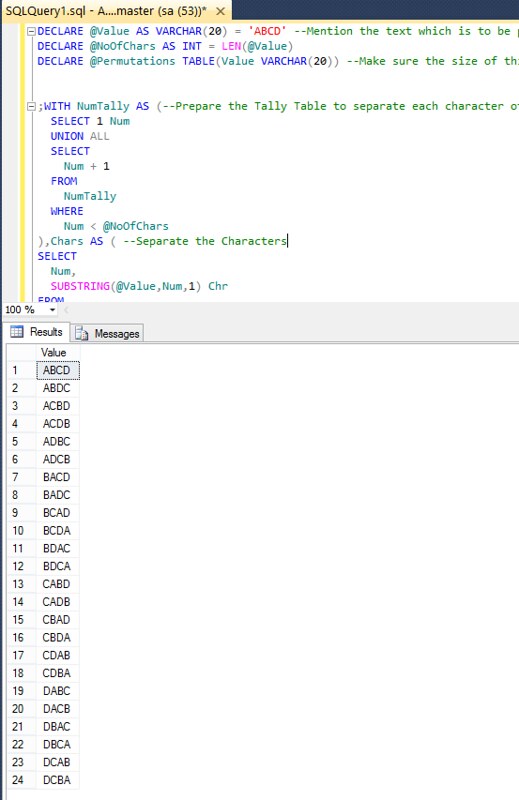
SQL Server – Generating PERMUTATIONS using T-Sql

SQL Server – Generating PERMUTATIONS using T-Sql


2014-05-25_1838

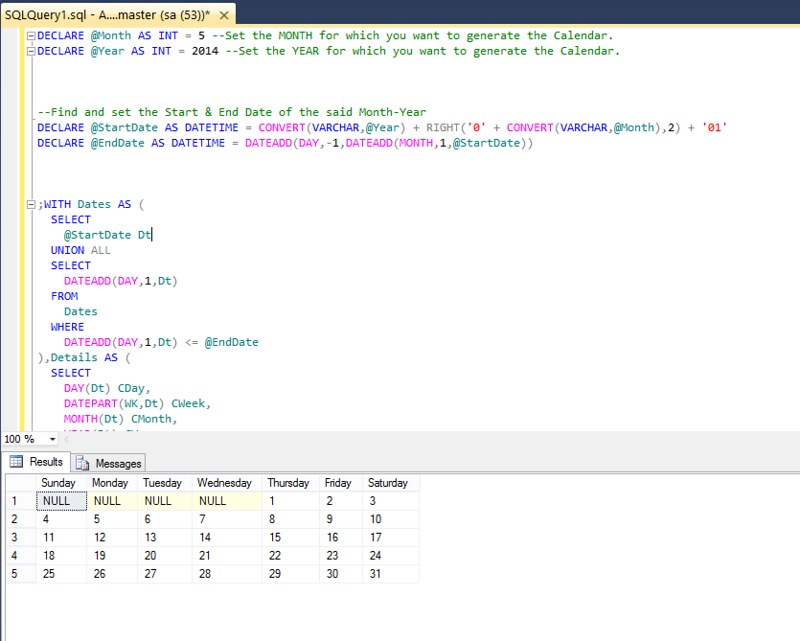
SQL Server – Generate Calendar using TSQL

Introduction
Recently, I found the way to display Calendar using SQL Server

Implementation
Below is the TSQL which I came up with to generate the Calendar -

2014-05-25_1816

Contact Form

Name

Email *

Message *